Relates to
Overview
Github
ESP-Now reference
Status
Examples
Broadcast
Broadcast 'main.cpp'
#include <Arduino.h>
#include <ArduinoJson.h>
#include <WiFi.h>
#include <MQTT.h>

#include <ConfigUtils.h>
#include <EspNowWrapper.h>
#include <ESPStringUtils.h>

DynamicJsonDocument config(5*1024);//5 KB
DynamicJsonDocument secret(1*1024);//1 KB
MQTTClient mqtt(1*1024);
WiFiClient wifi;//needed to stay on global scope
NowApp espnow;

uint32_t cycle_count = 0;

//https://esp32.com/viewtopic.php?t=12992

void meshMessage(String &payload,String from){
  Serial.printf("RX> from(%s) => [%s]\n",from.c_str(),payload.c_str());
  mqtt.publish("espnow/"+from,payload);
}

void setup() {

  Serial.begin(115200);
  timelog("Boot ready");

  load_json(config,"/config.json");
  load_json(secret,"/secret.json");
  timelog("config loaded");

  WiFi.mode(WIFI_MODE_STA);
  timelog("config loaded");

  espnow.start(config,secret);
  espnow.onMessage(meshMessage);

  espnow.set_channel(config["wifi"]["channel"]);

  timelog("setup() done");

}

void loop() {
  cycle_count++;
  Serial.printf("\n\n");
  timelog("loop start cycle ("+String(cycle_count)+")");
  espnow.print_info();
  espnow.broadcast("Hello Everyone ("+String(cycle_count)+")");
  delay(5000);
}Broadcast startup 'main.cpp'
rst:0x1 (POWERON_RESET),boot:0x13 (SPI_FAST_FLASH_BOOT)
configsip: 0, SPIWP:0xee
clk_drv:0x00,q_drv:0x00,d_drv:0x00,cs0_drv:0x00,hd_drv:0x00,wp_drv:0x00
mode:DIO, clock div:2
load:0x3fff0018,len:4
load:0x3fff001c,len:1044
load:0x40078000,len:8896
load:0x40080400,len:5828
entry 0x400806ac
36 : Boot ready
150 : config loaded

Brownout detector was triggered

ets Jun  8 2016 00:22:57

rst:0xc (SW_CPU_RESET),boot:0x13 (SPI_FAST_FLASH_BOOT)
configsip: 0, SPIWP:0xee
clk_drv:0x00,q_drv:0x00,d_drv:0x00,cs0_drv:0x00,hd_drv:0x00,wp_drv:0x00
mode:DIO, clock div:2
load:0x3fff0018,len:4
load:0x3fff001c,len:1044
load:0x40078000,len:8896
load:0x40080400,len:5828
entry 0x400806ac
37 : Boot ready
150 : config loaded
234 : wifi mode set
236 : setup() done
send => (ff:ff:ff:ff:ff:ff) 'Good Morning Everyone (0)'
237 : initial broadcast() done


237 : loop start cycle (1)
 Version=1;  channel=1;  peers=1 encrypted=0;   send_cb> Sent data to ff:ff:ff:ff:ff:ff, status: 0

send => (ff:ff:ff:ff:ff:ff) 'Hello Everyone (1)'
  send_cb> Sent data to ff:ff:ff:ff:ff:ff, status: 0
Log of Two boradcasters receivers
first instance
540465 : loop start cycle (109)
 Version=1;  channel=8;  peers=1 encrypted=0;
send => (ff:ff:ff:ff:ff:ff) 'Hello Everyone (109)'
  send_cb> Sent data to ff:ff:ff:ff:ff:ff, status: 0
RX> from(10:52:1c:68:e8:84) => [Hello Everyone (20)]

545466 : loop start cycle (110)
 Version=1;  channel=8;  peers=1 encrypted=0;
send => (ff:ff:ff:ff:ff:ff) 'Hello Everyone (110)'
  send_cb> Sent data to ff:ff:ff:ff:ff:ff, status: 0
RX> from(10:52:1c:68:e8:84) => [Hello Everyone (21)]
second instance
540465 : loop start cycle (109)
 Version=1;  channel=8;  peers=1 encrypted=0;
send => (ff:ff:ff:ff:ff:ff) 'Hello Everyone (109)'
  send_cb> Sent data to ff:ff:ff:ff:ff:ff, status: 0
RX> from(10:52:1c:68:e8:84) => [Hello Everyone (20)]


545466 : loop start cycle (110)
 Version=1;  channel=8;  peers=1 encrypted=0;
send => (ff:ff:ff:ff:ff:ff) 'Hello Everyone (110)'
  send_cb> Sent data to ff:ff:ff:ff:ff:ff, status: 0
RX> from(10:52:1c:68:e8:84) => [Hello Everyone (21)]
MQTT Wifi Gateway
In this example, a gateway is listening to ESP-Now, once a message is received, it is relayed to an MQTT broquer through wifi. This Gateway example is run with another device running the Broadcast example.
Wifi Gateway 'main.cpp'
#include <Arduino.h>
#include <ArduinoJson.h>
#include <WiFi.h>
#include <MQTT.h>

#include <ConfigUtils.h>
#include <EspNowWrapper.h>
#include <ESPStringUtils.h>

DynamicJsonDocument config(5*1024);//5 KB
DynamicJsonDocument secret(1*1024);//1 KB
MQTTClient mqtt(1*1024);
WiFiClient wifi;//needed to stay on global scope
NowApp espnow;

uint32_t cycle_count = 0;

//https://esp32.com/viewtopic.php?t=12992

void meshMessage(String &payload,String from){
  Serial.printf("RX> from(%s) => [%s]\n",from.c_str(),payload.c_str());
  mqtt.publish("espnow/"+from,payload);
}

void setup() {

  Serial.begin(115200);
  timelog("Boot ready");

  load_json(config,"/config.json");
  load_json(secret,"/secret.json");
  timelog("config loaded");

  WiFi.mode(WIFI_MODE_STA);
  timelog("config loaded");

  espnow.start(config,secret);
  espnow.onMessage(meshMessage);

  espnow.set_channel(config["wifi"]["channel"]);

  timelog("setup() done");

}

void loop() {
  cycle_count++;
  Serial.printf("\n\n");
  timelog("loop start cycle ("+String(cycle_count)+")");
  espnow.print_info();
  espnow.broadcast("Hello Everyone ("+String(cycle_count)+")");
  delay(5000);
}
Broadcaster log
rst:0x1 (POWERON_RESET),boot:0x13 (SPI_FAST_FLASH_BOOT)
configsip: 0, SPIWP:0xee
clk_drv:0x00,q_drv:0x00,d_drv:0x00,cs0_drv:0x00,hd_drv:0x00,wp_drv:0x00
mode:DIO, clock div:2
load:0x3fff0018,len:4
load:0x3fff001c,len:1044
load:0x40078000,len:8896
load:0x40080400,len:5828
entry 0x400806ac
36 : Boot ready
151 : config loaded
358 : config loaded
361 : setup() done


361 : loop start cycle (1)
 Version=1;  channel=5;  peers=1 encrypted=0;
send => (ff:ff:ff:ff:ff:ff) 'Hello Everyone (1)'
  send_cb> Sent data to ff:ff:ff:ff:ff:ff, status: 0


5365 : loop start cycle (2)
 Version=1;  channel=5;  peers=1 encrypted=0;
send => (ff:ff:ff:ff:ff:ff) 'Hello Everyone (2)'
  send_cb> Sent data to ff:ff:ff:ff:ff:ff, status: 0


10366 : loop start cycle (3)
 Version=1;  channel=5;  peers=1 encrypted=0;
send => (ff:ff:ff:ff:ff:ff) 'Hello Everyone (3)'
  send_cb> Sent data to ff:ff:ff:ff:ff:ff, status: 0


15367 : loop start cycle (4)
 Version=1;  channel=5;  peers=1 encrypted=0;
send => (ff:ff:ff:ff:ff:ff) 'Hello Everyone (4)'
  send_cb> Sent data to ff:ff:ff:ff:ff:ff, status: 0


20368 : loop start cycle (5)
 Version=1;  channel=5;  peers=1 encrypted=0;
send => (ff:ff:ff:ff:ff:ff) 'Hello Everyone (5)'
  send_cb> Sent data to ff:ff:ff:ff:ff:ff, status: 0


25369 : loop start cycle (6)
 Version=1;  channel=5;  peers=1 encrypted=0;
send => (ff:ff:ff:ff:ff:ff) 'Hello Everyone (6)'
  send_cb> Sent data to ff:ff:ff:ff:ff:ff, status: 0


30370 : loop start cycle (7)
 Version=1;  channel=5;  peers=1 encrypted=0;
send => (ff:ff:ff:ff:ff:ff) 'Hello Everyone (7)'
  send_cb> Sent data to ff:ff:ff:ff:ff:ff, status: 0


35371 : loop start cycle (8)
 Version=1;  channel=5;  peers=1 encrypted=0;
send => (ff:ff:ff:ff:ff:ff) 'Hello Everyone (8)'
  send_cb> Sent data to ff:ff:ff:ff:ff:ff, status: 0


40372 : loop start cycle (9)
 Version=1;  channel=5;  peers=1 encrypted=0;
send => (ff:ff:ff:ff:ff:ff) 'Hello Everyone (9)'
  send_cb> Sent data to ff:ff:ff:ff:ff:ff, status: 0


45373 : loop start cycle (10)
 Version=1;  channel=5;  peers=1 encrypted=0;
send => (ff:ff:ff:ff:ff:ff) 'Hello Everyone (10)'
  send_cb> Sent data to ff:ff:ff:ff:ff:ff, status: 0
Gateway log
272534 : loop start cycle (55)
5

277538 : loop start cycle (56)
5RX> from(10:52:1c:68:e8:84) => [Hello Everyone (3)]


282542 : loop start cycle (57)
5

287546 : loop start cycle (58)
5

292550 : loop start cycle (59)
5RX> from(10:52:1c:68:e8:84) => [Hello Everyone (6)]


297554 : loop start cycle (60)
5

302558 : loop start cycle (61)
5

307562 : loop start cycle (62)
5

312566 : loop start cycle (63)
5RX> from(10:52:1c:68:e8:84) => [Hello Everyone (10)]


317570 : loop start cycle (64)
5

322574 : loop start cycle (65)
5

327578 : loop start cycle (66)
5
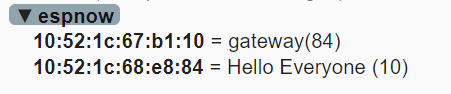
MQTT Explorer showing both topics received from the gateway:
the gateway itself with its mac address
the one related from the ESP-Now broadcaster device with the broadcaster mac address
FAQ - Discussion
Can I ran an ESP-Now wifi gateway ?
No, because relaying messages through wifi drops reception success from almost 100% to 25%. It is possible to remediate to this through retries but this will harm the power consumption of end devices which might be the first motivation to use ESP-Now. Therefore, it is recommended that the Gateway forwards messages to another device through a serial uart to maximize ESP-Now listening time.
Is it possible for a device to identify its ESP-Now peers ?
- No, given the ESP-Now API Reference, it looks like that it is a low level point to point messaging including broadcast, but not more. Therefore it's only based on mac addresses and does not have a higher level management. If it's needed to discover devices without entering their mac manually as a peer list, then it's probably better to look for ESP-Mesh which is intended to manage a fleet of devices. This ESP-Mesh-Wrapper is a wrapper for Arduino framework to make usage ESP-Mesh easier.
but I'm not really much satisfied with the custom protocols ideas, the ESP is at its best with wifi, when it comes to 2.4 GHz mesh solutions, why use a custom one while Standards exist like zigbee and Thread.
Can ESP-Now solve the 'Provisioning' Problem or make it easier ?
No, the provisioning dilemma is unfortunately common to all protocols and is a Home Automation Nightmare : "Provisioning / Pairing / Joining / Configuring".
Let's first have a look on other protocols deal with provisioning :
Zigbee : Is the worst I've ever seen, as the state is not visible to the user shared between a device and a server, if a device goes offline it still thinks it's paired, to overcome temporary network shortage, and if you want it to join a new network you need to actively be playing around with it to figure out how each device has a different way to be reset and then enable pairing on the gateway...
Wifi : has a secred that each device has to know, but how can you give that secret, the own hotspot is not easy, as you need a webserver and manual entry, there are some protocols designed to make that easier :
DDP Device Provisioning Protocol
- SmartConfig : this is another example, you can read more about Unified Provisioning on the Espressif website
Now, we might find wifi inconvenient for two reasons, provisioning and also range which is very limited compared to mesh networks that have repeaters.
- Custom RF : e.g. the same here applies for ESP-NOW or any other custom mesh such as the SimpleMesh which is as it's names suggest simple, but also stable. Changing the battery is not more complex than changing the battery. The way I solved the configuration issue there, is by an automated script run after attaching a devices with the debugger, it reads the serial number, which has an associated short id coming from a config file. That short id will be used in radio packets as unique ID, I could also assign a master key for encryption, but I did not need security as it is only about light and temperature values, no control.
So when it comes to ESP-Now, you also need to configure each of them to give them the security with "esp_now_set_pmk()" if you do not want everyone using your devices to spy on each other. The problem gets bigger if you want to give your devices to a user that has to use it securely on his network with a unique pmk and that user does not want to be flashing and messing with a configuration.
To summarize, there's no way around a "provisioning" process whatever protocol you use unless you need no security, nor networks isolation, or can flash the secret uniquely for each device, which is also a sort of provisioning. And not mentioning the provisioning that needs an internet connection to synchronise with a backend and user account.