Relates to
previously known as CHIP
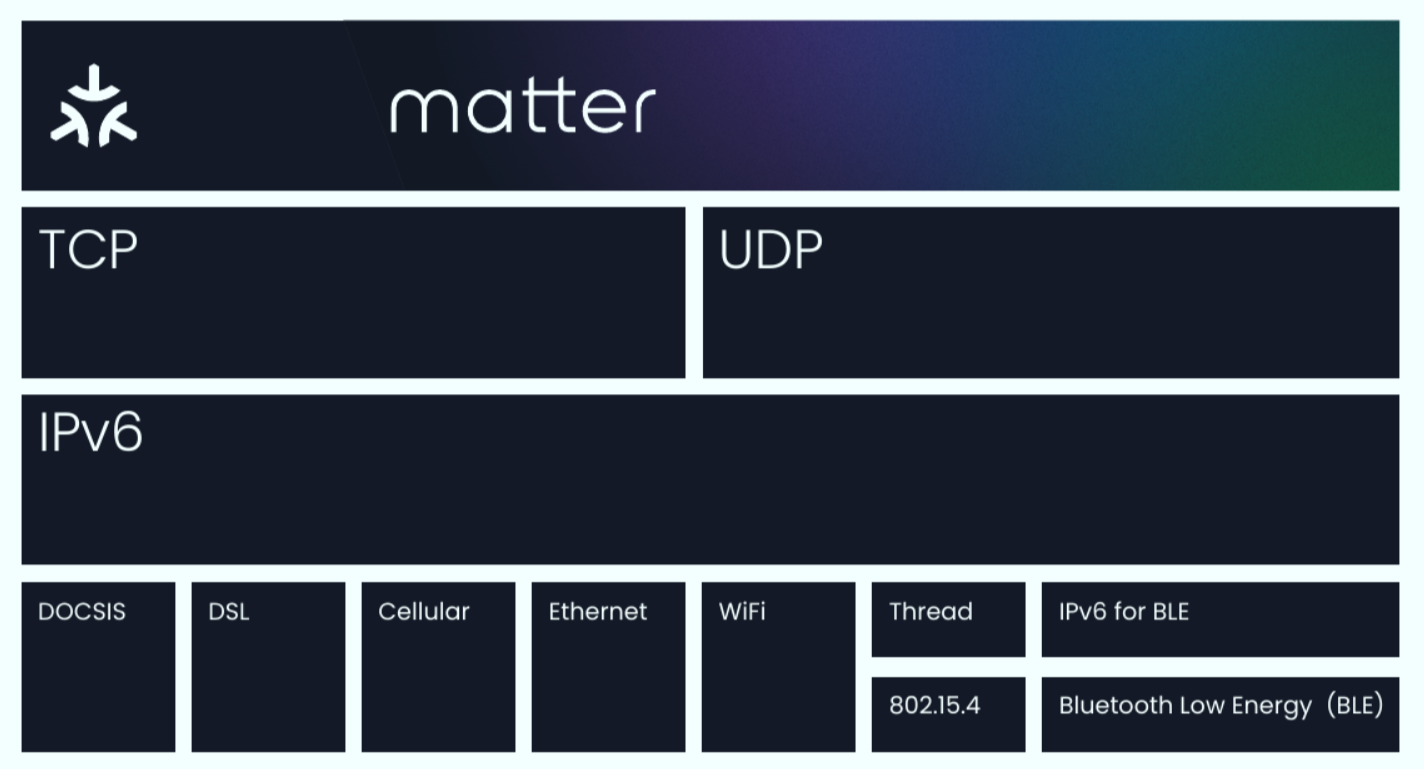
Overview
The image above does only focus on the relation between Matter, Thread and Zigbee. Both Matter and Zigbee run on 802.15.4 (optional for Matter), and both are directly or indirectly based on ZCL which is in case of Matter named ZAP Zigbee Cluster Library Advanced Platform.
Definition
We can consider the project Matter previously known as Connected Home Over IP definition as in two folds :
a takeover of the Zigbee Cluster Library to be fit over the IP layer.
The abstraction of all different transport protocols with IP
This will avoid that each transport (e.g. BT, Zigbee) have a custom app layer. It is interesting to notice that the Zigbee Alliance is driving this project whereas Zigbee itself does not map to an IP layer, and therefore Thread is the natural transition from Zigbee as both are 802.15.4 compliant at the bottom and both will keep the same logic of the ZCL that devices are familiar with.
Connectivity Standard Alliance
or csa. Links
Tools
ZAP : ZCL Advaned Platform
ZCL : Zigbee Cluster Library
on linux the following commands succeed using node v14.15.5 :
npm uninstall node-pre-gyp --save
npm install @mapbox/node-pre-gyp --save

npm install
npm run zap
Chip Tool
Command line helper tool :
building the chip-tool
clone, install dependencies and activate as described in this page
continue building the tool as described in this page
install nodejs and zap, only one mode is enough in case of no errors
wget https://github.com/project-chip/zap/releases/download/v2023.02.27/zap-linux.zip
unzip zap-linux.zip -d zap-linux
export ZAP_INSTALL_PATH=/home/pi/zap-linux/
curl -sSL https://deb.nodesource.com/setup_16.x | sudo bash -
git clone git@github.com:project-chip/zap.git
sudo apt-get update
sudo apt-get install --fix-missing libpixman-1-dev libcairo-dev libsdl-pango-dev libjpeg-dev libgif-dev
export ZAP_DEVELOPMENT_PATH=/home/pi/zap
used command
cd connectedhomeip
>./scripts/examples/gn_build_example.sh examples/chip-tool examples/chip-tool/build
using the chip tool
pairing
Chip tool commands for pairing
./chip-tool pairing ble-thread <node_id> hex:<operational_dataset> <pin_code> <discriminator>
./chip-tool pairing ble-thread 3 hex:0e08000000000001000035060004001fffe00708fd14711ac39b204d04102fac2bd6e7c4308f3e8e0cedd893d20f0c0402a0f7f8000300001801021234030c5468726561644d617474657202081111111122222222051000112233445566778899aabbccddeeff 20202021 3840
toggle light
./chip-tool onoff toggle 3 1 Running on nRF52
nRF Connect integration
The above diagram taken from the CHIP repo link in the button below, shows the integration of a CHIP application on top of the nRF Connect SDK.
install
mkdir ~/ncs && cd ~/ncs
west init -m https://github.com/nrfconnect/sdk-nrf --mr v1.4.0
west update
west zephyr-export
pip3 install --user -r zephyr/scripts/requirements.txt
pip3 install --user -r nrf/scripts/requirements.txt
pip3 install --user -r bootloader/mcuboot/scripts/requirements.txt
then on every new session
cd ncs
source zephyr/zephyr-env.sh
step 3, from the same link above install gn
lighting app
Update
prj.confparams to match the thread border router parametrs (e.g. channel,...)add CONFIG_BOARD_HAS_NRF5_BOOTLOADER=n
cd ncs/modules/lib/connectedhomeip/examples/lighting-app/nrfconnect/
west build -b nrf52840dongle_nrf52840 -t menuconfig
west build -b nrf52840dongle_nrf52840 -- -DCONF_FILE="prj.conf"
west flash
nrfjprog -f nrf52 --program zephyr.hex --sectorerase --verify
note on config :
the RTT logging is enabled to get the log through the SWD Segger J-Link interface, see
# Loggingsectionas CHIP is running over zephyr, a zephyr shell is provided alo through the RTT with config on the
# shellsectionthe shown
CONFIG_OPENTHREAD_MASTERKEYis a dummy key and has to be kept secret in a production environment
prj.conf
#
#    Copyright (c) 2020 Project CHIP Authors
#
#    Licensed under the Apache License, Version 2.0 (the "License");
#    you may not use this file except in compliance with the License.
#    You may obtain a copy of the License at
#
#        http://www.apache.org/licenses/LICENSE-2.0
#
#    Unless required by applicable law or agreed to in writing, software
#    distributed under the License is distributed on an "AS IS" BASIS,
#    WITHOUT WARRANTIES OR CONDITIONS OF ANY KIND, either express or implied.
#    See the License for the specific language governing permissions and
#    limitations under the License.
#

# This sample uses sample-defaults.conf to set options common for all
# samples. This file should contain only options specific for this sample
# or overrides of default values.

# Add support for LEDs and buttons on Nordic development kits
CONFIG_DK_LIBRARY=y
CONFIG_PWM=y

# Default OpenThread network settings
CONFIG_OPENTHREAD_PANID=4660
CONFIG_OPENTHREAD_CHANNEL=13
CONFIG_OPENTHREAD_NETWORK_NAME="OpenThreadDemo"
CONFIG_OPENTHREAD_XPANID="11:11:11:11:22:22:22:22"
CONFIG_OPENTHREAD_MASTERKEY="00112233445566778899aabbccddeeff"

# Bluetooth overrides
CONFIG_BT_DEVICE_NAME="ChipLight"

# Additional configs for debbugging experience.
CONFIG_THREAD_NAME=y
CONFIG_MPU_STACK_GUARD=y

# CHIP configuration
CONFIG_CHIP_PROJECT_CONFIG="main/include/CHIPProjectConfig.h"
CONFIG_CHIP_OPENTHREAD_CONFIG="../../platform/nrfconnect/project_include/OpenThreadConfig.h"

CONFIG_BOARD_HAS_NRF5_BOOTLOADER=n

# Logging
CONFIG_SERIAL=n
CONFIG_LOG=y
#CONFIG_LOG_BACKEND_RTT=y
CONFIG_LOG_BACKEND_UART=n
CONFIG_BOOT_BANNER=y
CONFIG_USE_SEGGER_RTT=y
CONFIG_CONSOLE=y
CONFIG_UART_CONSOLE=n
CONFIG_RTT_CONSOLE=y

# shell
CONFIG_LOG_BACKEND_RTT=n
CONFIG_SHELL=y
CONFIG_SHELL_BACKEND_RTT=y
CONFIG_SHELL_BACKEND_SERIAL=n
The log output is then as follows
RTT Log output
I: nRF5 802154 radio initialized
I: 4 Sectors of 4096 bytes
I: alloc wra: 0, ec0
I: data wra: 0, 227
*** Booting Zephyr OS build v2.4.99-ncs1-rc1  ***
I: Init CHIP stack
I: SoftDevice Controller build revision:
I: e5 c7 9c d9 91 00 1d 66 |.......f
I: ea fb 6e 7b 98 2f 42 0d |..n./B.
I: f1 60 93 c8             |...
I: Starting CHIP task
I: Init Thread stack
D: 593[DL] CHIP task running
D: 594[DL] In DriveBLEState
I: 614[DL] CHIPoBLE advertising disabled because device is fully provisioned
D: 615[DL] OpenThread State Changed (Flags: 0x0100103d)
D: 616[DL]    Device Role: DETACHED
D: 617[DL]    Thread Unicast Addresses:
D: 618[DL]         fdb0:f51f:154a:11be:0:ff:fe00:f002/64 valid preferred rloc
D: 620[DL]         fdb0:f51f:154a:11be:2294:a147:3648:185d/64 valid preferred
D: 621[DL]         fe80::4b5:84fc:320f:d2/64 valid preferred
I: 830[DL] OpenThread ifconfig up and thread start
I: 832[DL] OpenThread started: OK
I: 832[DL] Setting OpenThread device type to MINIMAL END DEVICE
I: 834[ZCL] Using ZAP con
Upon reset, more details in the log with regard to SetupQRCode
RTT Log output after reset
I: nRF5 802154 radio initialized
I: 4 Sectors of 4096 bytes
I: alloc wra: 0, 9c0
I: data wra: 0, 885
*** Booting Zephyr OS build v2.4.99-ncs1-rc1  ***
I: Init CHIP stack
I: SoftDevice Controller build revision:
I: e5 c7 9c d9 91 00 1d 66 |.......f
I: ea fb 6e 7b 98 2f 42 0d |..n./B.
I: f1 60 93 c8             |...
I: Starting CHIP task
I: Init Thread stack
I: 647[DL] OpenThread ifconfig up and thread start
I: 648[DL] OpenThread started: OK
I: 648[DL] Setting OpenThread device type to MINIMAL END DEVICE
I: 650[ZCL] Using ZAP configuration...
I: 651[ZCL] deactivate report event
I: 651[ZCL] Cluster callback: 6
I: 652[ZCL] Cluster callback: 8
I: 653[ZCL] Value: 255, length 1
D: 654[IN] TransportMgr initialized
I: 654[IN] local node id is lu

D: 655[IN] New pairing for device lu, key 112233!!
I: 657[SVR] Received a new connection.
I: 670[SVR] Network already provisioned. Disabling BLE advertisement
I: 672[SVR] Server Listening...
I: 672[DL] Device Configuration:
I: 682[DL]   Serial Number: (not set)
I: 682[DL]   Vendor Id: 9050 (0x235A)
I: 683[DL]   Product Id: 65279 (0xFEFF)
I: 693[DL]   Product Revision: 1
I: 702[DL]   Setup Pin Code: 12345678
I: 711[DL]   Setup Discriminator: 3840 (0xF00)
I: 721[DL]   Manufacturing Date: (not set)
I: 739[SVR] SetupQRCode:  [CH:I34DV*-00 0C9SS0]
I: 740[SVR] Copy/paste the below URL in a browser to see the QR Code:
I: 741[SVR] https://dhrishi.github.io/connectedhomeip/qrcode.html?data=CH%3AI34DV%2A-00%200C9SS0
D: 743[DL] CHIP task running
D: 744[DL] In DriveBLEState
I: 757[DL] CHIPoBLE advertising disabled because device is fully provisioned
D: 759[DL] OpenThread State Changed (Flags: 0x1100107d)
D: 760[DL]    Device Role: DETACHED
D: 761[DL]    Thread Unicast Addresses:
D: 762[DL]         fdde:ad00:beef:0:1e65:2162:2d83:6133/64 valid preferred
D: 763[DL]         fe80::2c53:1780:f20f:23ad/64 valid preferred
Example shell commands execution on the RTT
RTT shell commands and output
rtt:~$ ot masterkey
00112233445566778899aabbccddeeff

Done

rtt:~$ kernel threads
Scheduler: 104 since last call
Threads:
 0x200048e0 CHIP
  options: 0x0, priority: -1 timeout: 536889700
  state: pending
  stack size 8192, unused 7104, usage 1088 / 8192 (13 %)

 0x20002e40 SDC RX
  options: 0x0, priority: -10 timeout: 536882884
  state: pending
  stack size 1024, unused 832, usage 192 / 1024 (18 %)

 0x20002588 BT RX
  options: 0x0, priority: -8 timeout: 536880652
  state: pending
  stack size 1024, unused 832, usage 192 / 1024 (18 %)
...
rtt:~$ ot panid 0x1234
Done

D: 2488290[DL] OpenThread State Changed (Flags: 0x30008000)
D: 2488291[DL]    Network Name: ot_zephyr
D: 2488292[DL]    PAN Id: 0x1234
D: 2488293[DL]    Extended PAN Id: 0xDEAD00BEEF00CAFE
D: 2488294[DL]    Channel: 11
D: 2488295[DL]    Mesh Prefix: fdde:ad00:beef::/64
Running on ESP32
tested on board
ESP32 wemos miniselected
ESP32-DevKitCfrom menu configBlue led controlled by
statusLED1.Set(*value);Clusetr
ZCL_ON_OFF_CLUSTER_ID, attributeZCL_ON_OFF_ATTRIBUTE_ID
runlog
pc chip-tool
chip-tool client - pairing
wass@ryzen:~/connectedhomeip/examples/chip-tool/out/debug$ ./chip-tool pairing bypass 10.0.0.27 11097
CHIP:IN: TransportMgr initialized
CHIP:DIS: Init admin pairing table with server storage
CHIP:IN: Loading certs from KVS
CHIP:IN: local node id is 0x000000000001B669
CHIP:ZCL: Using ZAP configuration...
CHIP:ZCL: deactivate report event
CHIP:CTL: Getting operational keys
CHIP:CTL: Generating credentials
CHIP:CTL: Loaded credentials successfully
CHIP:IN: New pairing for device 0x0000000000bc5c01, key 0!!CHIP:DL:
CHIP task running
CHIP:TOO: Secure Pairing Success
CHIP:TOO: Pairing Success
CHIP:CTL: Shutting down the commissioner
CHIP:CTL: Shutting down the controller
CHIP:DL: System Layer shutdown
CHIP:DL: Inet Layer shutdown
CHIP:DL: BLE layer shutdown
chip-tool client - command
wass@ryzen:~/connectedhomeip/examples/chip-tool/out/debug$ ./chip-tool onoff toggle 1
CHIP:IN: TransportMgr initialized
CHIP:DIS: Init admin pairing table with server storage
CHIP:IN: Loading certs from KVS
CHIP:IN: local node id is 0x000000000001B669
CHIP:ZCL: Using ZAP configuration...
CHIP:ZCL: deactivate report event
CHIP:CTL: Getting operational keys
CHIP:CTL: Generating credentials
CHIP:CTL: Loaded credentials successfully
CHIP:DL: CHIP task running
CHIP:TOO: Sending cluster (0x0006) command (0x02) on endpoint 1
CHIP:DMG: ICR moving to [Initialize]
CHIP:DMG: ICR moving to [AddCommand]
CHIP:IN: New pairing for device 0x0000000000bc5c01, key 0!!
CHIP:IN: Secure message was encrypted: Msg ID 1
CHIP:IN: Sending msg from 0x000000000001B669 to 0x0000000000BC5C01 at utc time: 3688372 msec
CHIP:IN: Sending secure msg on generic transport
CHIP:IN: Secure msg send status No Error
CHIP:DMG: ICR moving to [   Sending]
CHIP:IN: Secure transport received message destined to node ID (0x000000000001B669)
CHIP:EM: Received message of type 9 and protocolId 327680
CHIP:DMG: InvokeCommand =
CHIP:DMG: {
CHIP:DMG: 	CommandList =
CHIP:DMG: 	[
CHIP:DMG: 		CommandDataElement =
CHIP:DMG: 		{
CHIP:DMG: 			CommandPath =
CHIP:DMG: 			{
CHIP:DMG: 				EndpointId = 0x1,
CHIP:DMG: 				ClusterId = 0x6,
CHIP:DMG: 				CommandId = 0x2,
CHIP:DMG: 			},
CHIP:DMG:
CHIP:DMG: 			StatusElement =
CHIP:DMG: 			{
CHIP:DMG: 				GeneralCode = 0x0,
CHIP:DMG: 				ProtocolId = 0x5,
CHIP:DMG: 				protocolCode = 0x0,
CHIP:DMG: 			},
CHIP:DMG:
CHIP:DMG: 		},
CHIP:DMG:
CHIP:DMG: 	],
CHIP:DMG:
CHIP:DMG: }
CHIP:EM: Sending Standalone Ack for MsgId:00000001
CHIP:IN: Secure message was encrypted: Msg ID 2
CHIP:IN: Sending msg from 0x000000000001B669 to 0x0000000000BC5C01 at utc time: 3689394 msec
CHIP:IN: Sending secure msg on generic transport
CHIP:IN: Secure msg send status No Error
CHIP:EM: Flushed pending ack for MsgId:00000001
CHIP:ZCL: DefaultResponse:
CHIP:ZCL:   Transaction: 0x558001796dd0
CHIP:ZCL:   status: EMBER_ZCL_STATUS_SUCCESS (0x00)
CHIP:TOO: Default Success Response
CHIP:DMG: ICR moving to [Uninitiali]
CHIP:CTL: Shutting down the controller
CHIP:DL: System Layer shutdown
CHIP:DL: Inet Layer shutdown
CHIP:DL: BLE layer shutdown
esp32 monitor
esp32 Matter server
E (20563) chip[IN]: Secure transport received message destined to node ID (0x0000000000BC5C01)
I (20563) chip[IN]: Setting fabricID 1B669 on admin.
I (20563) chip[IN]: Since admin was modified, persisting changes to KVS
I (21273) chip[SVR]: Stored value in server storage
I (21293) chip[DIS]: Admin (0) persisted to storage. Calling OnAdminPersistedToStorage
I (21293) chip[ZCL]: OpCreds: Admin 0 was persisted to storage. FabricId 00001B66900000000, NodeId bc5c01000000000000306E, VendorId 0x0632
I (21303) chip[ZCL]: OpCreds: Call to writeAdminsIntoFabricsListAttribute
I (21313) chip[ZCL]: OpCreds: Skipping over unitialized admin with fabricId 0x000000000001B669, nodeId 0x0000000000BC5C01 vendorId 0x0000
I (21323) chip[ZCL]: OpCreds: Stored 0 admins in fabrics list attribute.
I (21333) chip[EM]: Received message of type 8 and protocolId 327680
V (21343) chip[EM]: ec id: 39017, Delegate: 0x3ffcca68
V (21343) chip[DMG]: ICR moving to [Initialize]
V (21353) chip[ZCL]: Received Cluster Command: Cluster=6 Command=2 Endpoint=1
I (21353) chip[ZCL]: On/Off set value: 1 2
I (21363) chip[ZCL]: Toggle on/off from 0 to 1
I (21363) app-devicecallbacks: PostAttributeChangeCallback - Cluster ID: '0x0006', EndPoint ID: '0x01', Attribute ID: '0x0000'
I (21383) app-devicecallbacks: set ZCL_ON_OFF_ATTRIBUTE_ID to value: 1
I (21383) app-devicecallbacks: Current free heap: 115004

I (21393) app-devicecallbacks: PostAttributeChangeCallback - Cluster ID: '0x0008', EndPoint ID: '0x01', Attribute ID: '0x0000'
I (21403) app-devicecallbacks: Unhandled cluster ID: 8
I (21413) app-devicecallbacks: Current free heap: 115004

I (21413) app-devicecallbacks: PostAttributeChangeCallback - Cluster ID: '0x0005', EndPoint ID: '0x01', Attribute ID: '0x0003'
I (21433) app-devicecallbacks: Unhandled cluster ID: 5
I (21433) app-devicecallbacks: Current free heap: 115004

V (21443) chip[DMG]: ICR moving to [AddCommand]
V (21443) chip[IN]: Secure message was encrypted: Msg ID 1
I (21453) chip[IN]: Sending msg from 0x0000000000BC5C01 to 0x000000000001B669 at utc time: 20779 msec
I (21463) chip[IN]: Sending secure msg on generic transport
I (21473) chip[IN]: Secure msg send status No Error
V (21473) chip[DMG]: ICR moving to [   Sending]
V (21473) chip[DMG]: ICR moving to [Uninitiali]
E (21483) chip[DL]: Long dispatch time: 920 ms
E (21483) chip[IN]: Secure transport received message destined to node ID (0x0000000000BC5C01)
I (21493) chip[EM]: Received message of type 16 and protocolId 0
Comissioning
Each device will generate a setup QR Code, in this case CH:I34DV*-00 0C9SS0 which is a sectret not to be shared for production devices.

QR code generators services are abundant, but for production devices, better not to use an online generator and rely on an offline one to minimize risks.
In order to facilitate the creation, an url is provided where the string to be converted is passed as argument in the data= param to an app that cretates the QR code on the page :
using an Android App
FAQ - Discussion
Is CHIP yet another invention to push consumers into buing new products ?
I do not think so. If existing devices have their own gateway and consumers already have them, there's no need to update.
If a user now buys a new product with the new technology (CHIP, Thread), its integration should not require a vendor specific gateway, this is an advantage for the user. This dissolves the lockin to a particular device supplier which is also for the users benefit.
Will CHIP replace zigbee ?
For new products, I would expect more CHIP devices in the future than zigbee, although this is a bet that depends on how hard the transition is. Given that the underlying RF physical layer is the same
802.15.4, hardware suppliers have no excuses about hardware incompatibilities.Software is not an easy task, for already deployed devices, this will depend on the reliability of the firmware update, and if old devices do have enough capacity for a bigger sw stack. For new devices, all of the software stack is available as opensouce and any startup or maker can use it as described in this page.
Even if new products would have CHIP exclusively, the provided solutions will have to allow cohabitation of CHIP/Thread and zigbee for a long time. This is possible through usage of different channels or even the same with different network ids.
Combining a multi protocol gateway for both Thread and Zigbee is an interesting idea that I have not see, but it could reduce the gateways that have to stay deployed. It would require multiple Radio Co Processors though to allow operation in different channels.